Home Blog Page 274

ASUS ROG Flow X13 Review: The future of gaming notebooks

0

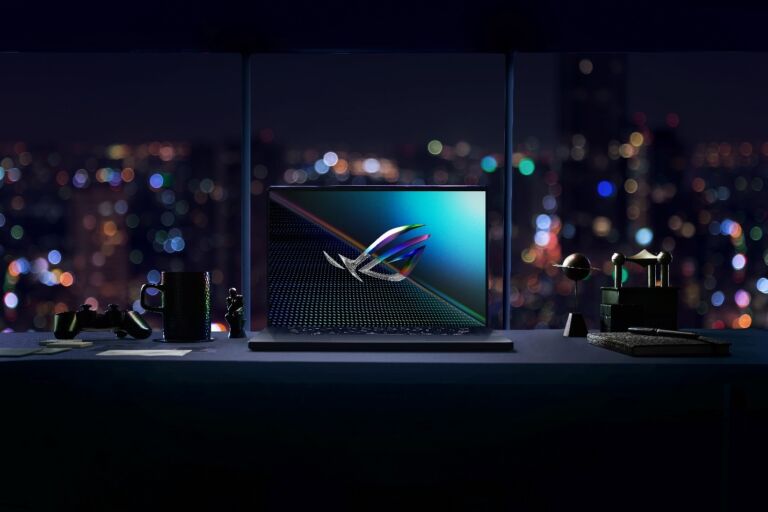
ASUS ROG is known for creating different gaming laptops whether that’s an odd one that works like the ASUS ROG Zephyrus Duo or something that is really powerful and functional like the ASUS ROG Strix Scar but they all have a similar problem – they are bulky and heavy and it seems that the ROG team has found a way to have something that is light and also powerful and that’s the ASUS ROG Flow X13.

ASUS ROG Flow X13 Specs

  • AMD Ryzen 9 5900HS
  • Nvidia GeForce GTX 1650 GPU 4GB GDDR6
  • 13.4″ 16:10 4K WQUXGA Display, 60Hz, IPS, Pantone Validated, Touchscreen
  • 16GB LPDDR4X RAM, 4266MHz
  • 1TB M.2 2230 PCIe 3.0 x4 SSD
  • 1x ROG XG Mobile Interface (PCIe 3.0 x8)
  • 1x USB-A 3.2 Gen 2, 2x USB-C 3.2 Gen 2, 1x Audio Combo Jack, 1x HDMI
  • WiFi 6, Bluetooth 5.1
  • 720p HD webcam
  • 52Wh Battery
  • 100W USB-C power adaptor
  • 299 x 222 x 15.8mm, 1.3kg
  • Windows 10 Home

ASUS ROG Flow X13 Review: Design and hardware

If you’re buying the notebook, it’s a must that you have the ASUS ROG XG Mobile with you and yes, the combination of the notebook and also the XG Mobile will cost you an arm and a leg but with this duo, you’ll get a really powerful notebook but still features an ultra-slim notebook. How thin? Only 0.62” thick. Yep. That slim.

Unlike the other ASUS ROG notebooks that we’ve seen before. The ASUS ROG Flow X13 is also a convertible notebook that you can twist up to 360-degrees. This makes the notebook perfect not just for gaming but also for productivity. There’s a touchscreen display too and it supports ASUS Stylus so you can sign your documents on the notebook or draw with it.

As for the body and lid of the notebook, it comes in a magnesium alloy cover which is sturdy and also lightweight. I actually appreciate that the notebook features a minimalistic ROG design instead of those too edgy gaming looks. It also has a wave pattern with a subtle half-slice on the lid. For the logos, there are the small and minimalistic ROG logos on the lid and also on the keyboard palm rest of the notebook.

For the ports, there’s not much to see on this one but we got here a USB 3.2 Gen 2 Type-A along with the USB 3.2 Gen 2 Type-C with DP1.4 and PD on one side and also a proprietary PCIe 3.0 x8 and USB 3.2 Gen 2 Type-C on the other side along with the HDMI 2.0b and also the 3.5mm audio combo jack. This is already perfect for me as I only need one USB Type-A port most of the time when I’m outside for my mouse or drive then I can use the USB type-C for other stuff. Unfortunately, no card readers here for content creators. Another cool thing about the notebook is the power button also serves as the fingerprint scanner on the smartphone unfortunately, there’s no IR camera on this one.

At the top of the notebook is a 720p webcam so you can still use the notebook for Zoom calls and Teams and despite that, the bezel on the sides and at the top of the notebook is thin enough for my usage.

The USB Type-C port on the notebook is also the port for the charger as the notebook comes with a 100W USB-C charger. But once you have the ROG XG Mobile, you don’t have to use that one anymore.

For watching videos, you would definitely appreciate the speaker as this one offers a pretty good audio quality but I still suggest that you use your headphones or speakers for this one to get better quality.

ASUS ROG Flow X13 Review: Keyboard and touchpad

The keyboard unmistakably came from ASUS ROG and as for the experience, well, this one is overall pretty good even for gaming. There’s enough travel distance on this one and the strokes were pretty responsive on this one so whether you’re typing or you’re gaming, the keyboard of this one won’t be a problem to you.

There’s a white backlight on the keyboard too and unfortunately, there are no RGB lights on the keyboard but you can still customize the lighting effects on the ASUS ROG Flow X13. There are dedicated buttons too for the volume, mic button, and for the ROG Armoury crate app in where you can see every status that you need on the notebook.

For the touchpad, the size is just a decent size. It’s enough for normal usage for work and office. It’s responsive and also precise but it isn’t glass so it isn’t the best touchpad but just a fine one for your everyday use of the notebook.

 ASUS ROG XG Mobile

There might not be enough ports on the ASUS ROG Flow X13 but once you plug in the ROG XG Mobile to the PCIe 3.0 x8 and USB 3.2 Gen 2 Type-C, you’ll get all the ports that you need for the notebook. The XG Mobile comes with either RTX 3070 and RTX 3080 GPU inside and it comes with different I/O ports including 4x USB 3.2 Gen 1 Type-A ports, 1x SD card reader, 1x RJ-45 LAN Port, 1x HDMI 2.0b, and 1x DP 1.4. Basically, all the ports that you need, and then there’s the 280W Power Supply too to power up the GPU.

The one that I got comes with GeForce RTX 3080 GPU and it’s clocked at 1810MHz and comes with a power of 150W.

Unlike other eGPU, this one is portable as this one is lightweight at 1kg and the dimensions is really small at 20.8 x15.5 x 2.96 cm. There’s a fan on the XG Mobile that helps in the thermal of the XG Mobile in case you’re playing games or doing some heavy tasks on the notebook. To improve it, even more, there’s a built-in stand too with some cool design on this one.

ASUS ROG Flow X13 Review: Display

The ASUS ROG Flow X13’s display is a creator’s dream. There’s the 4K panel on this one with a 60Hz refresh rate and the colors were pretty good and again, this one is a touchscreen display. It’s Pantone Validated too which is why editing photos and videos on the display of the laptop was really good.

Since we got here more accurate colors and a 4K panel, this one is more optimized for content creation rather than gaming as we only got here a 60Hz refresh rate which isn’t ideal for a gaming notebook. There’s a 16:10 aspect ratio too which is perfect for productivity use and more space for windows for me instead of 16:9.

ASUS ROG Flow X13 Review: Battery Life

The battery life on the ASUS ROG Flow X13 is pretty solid. We got here 6 hours of battery life in normal usage of the notebook which is enough for my daily usage but of course, when you play games on the notebook, do expect shorter battery life on this one.

ASUS ROG Flow X13 Review: Armoury Crate

The ASUS ROG Flow X13 comes with some preinstalled apps but the one that you would really use is the Armoury crate. You can add profiles for the notebook and check out the resources like CPU usage, GPU, Usage, memory, and even storage. But the most useful for me is that I can control the performance of the notebook here and its fans.

Since this is ASUS, we also got Aura Sync and again, you can control the keyboard lighting on the notebook.

ASUS ROG Flow X13 Review: Performance

Here’s the interesting part on the notebook – the performance. The one that we got comes with AMD Ryzen 9 5800HS for the processor and it comes with a dedicated GTX 1650 Max-Q GPU and for its size, and thickness, the ASUS ROG Flow X13’s GPU is already pretty good and as for the thermals, it isn’t the best one but it doesn’t get too uncomfortably hot when in normal usage. As for the performance, well, it’s really good even on the GTX 1650 Max-Q. Check out the benchmarks that we got on different applications.

In Cinebench R23, we can clearly see that the AMD Ryzen 9 5900HS processor inside the notebook is clearly powerful and it can beat even other desktop processors that are available in the market right now. This one looks promising.

In GeekBench, the ASUS ROG Flow X13 further proves that the processor inside it is really powerful as we got a really high score.

ASUS ROG Flow X13 on GTX 1650 Max-Q
ASUS ROG Flow X13 on RTX 3080

While in 3DMark Time Spy, the ASUS ROG Flow X13’s dedicated GTX 1650 GPU is powerful enough for some games but plugging in my XG Mobile gives us a really powerful performance and handling every game that we need on the notebook. The RTX 3080 on the XG Mobile gives us 3x more performance base on this benchmark.

Shadow of the Tomb Raider - ASUS ROG Flow X13 on GTX 1650 Max-Q
Shadow of the Tomb Raider – ASUS ROG Flow X13 on GTX 1650 Max-Q
Shadow of the Tomb Raider – ASUS ROG Flow X13 on RTX 3080 RTX & DLSS
Shadow of the Tomb Raider - ASUS ROG Flow X13 on RTX 3080 no RTX & DLSS
Shadow of the Tomb Raider – ASUS ROG Flow X13 on RTX 3080 no RTX & DLSS

For gaming, we tested it at different games and the difference between the GTX 1650 and the RTX 3080 is just drastic. So if you’re planning on gaming on this one, be sure to get an XG mobile for the ASUS ROG Flow X13.

Watchdogs: Legion — ASUS ROG Flow X13 on GTX 1650 Max-Q
Watchdogs: legion — ASUS ROG Flow X13 on RTX 3080 no RTX & DLSS
Watchdogs: legion — ASUS ROG Flow X13 on RTX 3080 with RTX

The performance of the notebook has also improved when I use it in tent mode instead of laptop mode as the airflow is way better and it offers better thermals thus, improving performance.

ASUS ROG Flow X13 Review: Verdict

Overall, the ASUS ROG Flow X13 is promising. It’s the future of slim gaming notebooks. The XG Mobile is a good start and we might see more notebooks that will support this external GPU. The form factor of the notebook is flexible whether you’re a gamer or you just want to use it for daily usage and it’s jam-packed with everything that we love on a notebook – stylish, powerful, and also portable.

The ASUS ROG Flow X13 might come in a complete package but this one is still a little bit expensive for some people as the notebook doesn’t come with the XG Mobile yet. But again, it’s a great laptop and I definitely love using this one.

The ASUS ROG Flow X13 starts at Php89,995. The ROG XG Mobile starts at Php69,995

Get exclusive deals and discounts on your favorite tech brands at Shopee 5.5 Brands Festival

0

Want to save up to 90% on your next tech purchase?

Good news! Your favorite tech brands have officially announced that they would join the party at Shopee 5.5 Brands Festival, allowing local fans to score amazing deals on cool gadgets and other products.

Happening until May 5, Shopee revealed that shoppers can expect discounts up to 90% off, flash deals up to 50% off, free shipping with no minimum spend, and 50% cashback from top-selling brands, such as OPPO, vivo, realme, Colgate, Abbott, L’Oreal Paris, Enfagrow, Procter & Gamble, Olay, Unilever, Nestle, Colourette Cosmetics, and Maybelline.

Daily promotions are also announced, as brands are bound to go back-to-back on Shopee.

YOU DON’T WANT TO MISS YOUR CHANCE TO ENJOY DISCOUNTS UP TO 90% OFF ON YOUR FAVORITE TECH BRANDS!
  • OPPO – April 29
  • vivo – May 1
  • realme – May 2
THERE’S MORE!
Consumers can bring home over Php1,000,000 worth of prizes at Shopee Prizes Sale on May 3, and redeem over Php5,000 worth of vouchers at Brands Vouchers Sales on May 4.

Meanwhile, Shopee will also hold a Home Fair until May 1 and Electronics Fair from May 2 to May 4, allowing consumers to redeem 50% cashback and enjoy flash deals up to 50% off.

HERE ARE THE AMAZING PROMOS YOU CAN GET AT SHOPEE 5.5 D-DAY DEALS:

  • Pampers
    Up to 34% off on the entire Pampers line
    Up to 50% off on select products from 12:00AM to 2:00AM and 6:00PM to 7:00PM●
  • Enfagrow
    Up to 37% discount on Enfamama A+, Enfagrow A+ Nurapro, Enfagrow A+ range, and more
  • Vivo – get Php300 off each purchase with Php6,000 minimum spend by using the Shopee-exclusive ‘VIVO300’ voucher code.
  • Nestlé – get 50% off Nestlé favorites, including Bear Brand Powdered Milk, Nestlé All-Purpose Cream, and Nescafé Gold.
  • Colourette – enjoy up to 50% off selected Colourette products and get free shipping for a minimum spend of Php999.

So, are you joining the fun?

Share your thoughts with us!

OPPO A74 5G arrives in PH for only Php15,999

0

OPPO has dropped an affordable 5G-ready device to the Philippine smartphone market, as it officially launched the OPPO A74 5G in the country.

The new A74 5G is loaded with irresistible offerings, such as stylish design, 5G feature, and capable specs.

For starters, it flashes a stunning physique, allowing consumers to choose from its beautiful variants: Fluid Black, and Space Silver. OPPO also packed the A74 5G with a 6.5-inch screen with an FHD+ resolution, making sure that users will enjoy watching videos or playing games with heavy animations and colors.

Under the hood, it is loaded with a Snapdragon 480 5G chipset and an Adreno 619 GPU. The device is coupled with a large 6GB of RAM and 128GB storage, as well, enabling users to handle their mobile tasks without any hassle.

Moving on to its photography department, OPPO armed it with quad rear cameras, consisting of a 48MP main shooter, 8MP ultrawide lens, 2MP macro lens, and a 2MP depth sensor. For selfies, it has a 16MP snapper.

To keep the A74 5G running, OPPO equipped it with a whopping 5,000mAh battery that supports 18W fast charging.

OPPO A74 5G Key Specs:

  • Android 11, ColorOS 11.1
  • 6.5-inch (2400 x 1080) FHD+ display with 90Hz refresh rate
  • Qualcomm Snapdragon 480 5G octa-core processor
  • Adreno 619 GPU
  • 6GB RAM
  • 128GB storage, expandable up to 512GB via microSD card
  • 48MP main + 8MP ultrawide + 2MP macro + 2MP depth
  • 16MP selfie camera
  • WiFi 802.11 a/b/g/n/ac, Bluetooth 5.1
  • 5G-ready, LTE
  • NFC
  • GPS with A-GPS, GLONASS, Galileo, BDS
  • Type-C
  • Sensors: fingerprint (side-mounted), accelerometer, light, orientation, proximity, gyroscope,
  • 5,000mAh battery with 18W fast charging
  • Colors: Fluid Black, Space Silver

PRICING AND AVAILABILITY

The OPPO A74 5G will be available starting May 5 for an asking price of only Php15,999.

The device can be purchased exclusively via OPPO’s official online stores on Lazada and Shopee and via local network providers Globe and Smart. Consumers can now pre-order it on Shopee until May 4, while it will be up for sale on the said platform beginning May 5. On Lazada, consumers can score it starting May 9.

Meanwhile, the OPPO A74 5G’s postpaid plans are yet to be announced.

Stay tuned!

Find the best Xiaomi phone for you at the Mi Fan Festival 2021

0

Xiaomi wants consumers to treat themselves at this year’s Mi Fan Festival, giving fans a chance to enjoy special offers on Mi Stores and authorized channels.

During the event, Xiaomi fans can score their dream phone at a discounted price, allowing them to purchase a great device at a much affordable rate.

So, whether you are looking for a basic phone, a device that can support your productivity tasks, a stylish yet powerful handset, or a gaming-centric smartphone, then, this festival gives you the perfect opportunity to buy one!

Here are the participating devices from Xiaomi and Redmi:

  • Mi 11 (8GB/128GB) – Php14,990
  • Redmi Note 10 Pro (6GB/128GB) – Php12,590
  • Redmi Note 10 Pro (8GB/128GB) – Php13,590
  • Redmi Note 10 (4GB/64GB) – Php8,490
  • Redmi Not 10 (6GB/128GB) – Php9,990
  • Redmi Note 9 Pro (4GB/64GB) – Php11,990 (Mi Fan Festival Discounted Price: Php10,990)
  • Redmi Note 9 Pro (6GB/128GB) – Php10,990 (Mi Fan Festival Discounted Price: Php9,990)
  • Redmi Note 9S (4GB/64GB) – Php11,990 (Mi Fan Festival Discounted Price: Php9,490)
  • Redmi Note 9S (6GB/128GB) – Php12,990 (Mi Fan Festival Discounted Price: Php10,490)
  • Redmi 9T (4GB/64GB) – Php6,990
  • Redmi 9T (6GB/128GB) – Php7,990
  • Redmi 9A (2GB/32GB) – Php4,690
  • Redmi 9C (3GB/64GB) – Php5,990
  • Mi Band 6 – Php1,990

There’s more!

Those who will buy the Redmi Note 10 Pro will get three tickets to the exclusive Melody with Mi special online concert, which will feature OPM rock icon Bamboo. On the other hand, buyers of the Redmi 9A and Redmi 9C will receive one ticket.

Meanwhile, purchases of Php25,000 and above will not only entitle you to tickets to the concert, but it will also give you access to the Meet & Greet and its after-party event.

To get your tickets, you simply have to scan the QR code in the Melody with Mi poster, fill out the form, and attach your proof of purchase. Tickets will be sent to valid customers via email or SMS.

So, are you joining the party?

Let us know what you think in the comment section below!

Samsung unveils the Galaxy Book Pro and Galaxy Book Pro 360 with Super AMOLED displays

0

Samsung has unveiled their new notebook series to the public and these are the Galaxy Book, Galaxy Book Pro, and the Galaxy Book Pro 360. These notebooks come in different variants but they all come with the latest 11th Generation Intel processors inside and Intel Iris Xe graphics with the Galaxy Book Pro series verified for the Intel Evo Platform.

Some of the notebooks will come with LTE and 5G and of course since this is the 11th Generation Intel processors inside, we can get to see WiFi 6e inside. For the Galaxy Book Pro series, we can get to see Samsung’s first-ever Windows PCs with Super AMOLED displays so you can experience rich and vivid colors.

Both the Galaxy Book Pro and the Galaxy Book Pro are premium notebooks with the latest 11th Gen Intel processors inside but as expected, the Galaxy Book Pro 360 is a convertible laptop that supports S-Pen and both come with Super AMOLED displays.

Samsung Galaxy Book Specs

  • 11th Generation Intel Core i3/i5/i7/Pentium Gold/Celeron
  • 15.6-inch TFT LCD Full HD
  • Graphics:
    • Intel Iris Xe graphics
    • Intel UHD Graphics
    • Nvidia GeForce MX450 graphics
  • 4GB/8GB/16GB DDR4x RAM
  • Up to 1TB NVMe SSD
  • WiFi 6, Bluetooth 5.1, Gigabit Ethernet
  • 2x USB Type-C, 3x USB 3.2, HDMI, headphone/mic jack, microSD card slot, RJ45, nano sim
  • Fingerprint on power key
  • 720p HD Webcam
  • 54Wh Battery
  • 65W USB Type-C Charger
  • Windows 10
  • 356.6 x 229.1 x 15.4mm

Samsung Galaxy Book Pro 13 Specs

  • 11th Generation Intel Core i3/i5/i7/
  • 13.3-inch AMOLED Full HD
  • Graphics:
    • Intel Iris Xe graphics (i5,i7)
    • Intel UHD Graphics (i3)
  • 8GB/16GB/32GB LPDDR4x RAM
  • Up to 1TB NVMe SSD
  • WiFi 6, Bluetooth 5.1, Gigabit Ethernet
  • 1x Thunderbolt 4, 1x USB-C, 1x USB 3.2, headphone/mic jack, microSD, nano SIM
  • Fingerprint on power key
  • 720p HD Webcam
  • 63Wh Battery
  • 65W USB Type-C Charger
  • Windows 10 Home/Pro
  • 304.4 x 199.8 x 11.2mm, Wi-Fi: 0.87kg, LTE: 0.88kg
  • Mystic Blue, Mystic Silver, Mystic Pink Gold

Samsung Galaxy Book Pro 15 Specs

  • 11th Generation Intel Core i3/i5/i7/
  • 15.6-inch AMOLED Full HD
  • Graphics:
    • Intel Iris Xe graphics (i5,i7)
    • Intel UHD Graphics (i3)
    • Nvidia GeForce MX450
  • 8GB/16GB/32GB LPDDR4x RAM
  • Up to 1TB NVMe SSD
  • WiFi 6, Bluetooth 5.1, Gigabit Ethernet
  • 1x Thunderbolt 4, 1x USB-C, 1x USB 3.2, 1x HDMI, headphone/mic jack, microSD, nano SIM
  • Fingerprint on power key
  • 720p HD Webcam
  • 68Wh Battery
  • 65W USB Type-C Charger
  • Windows 10 Home/Pro
  • Dimensions:
      • INT: 355.4 x 225.8 x 11.7mm, 1.05kg
      • EXT: 355.4 x 225.8 x 13.3mm, 1.15kg
  • Mystic Blue, Mystic Silver, Mystic Pink Gold

Samsung Galaxy Book Pro 360 13 Specs

  • 11th Generation Intel Core i3/i5/i7
  • 13.3-inch AMOLED Full HD
  • Graphics:
    • Intel Iris Xe graphics (i5,i7)
    • Intel UHD Graphics (i3)
  • 8GB/16GB LPDDR4x RAM
  • Up to 1TB NVMe SSD
  • WiFi 6, Bluetooth 5.1, Gigabit Ethernet, 5G
  • 1x Thunderbolt 4, 2x USB-C, headphone/mic jack, microSD, nano SIM
  • Fingerprint on power key
  • 720p HD Webcam
  • 63Wh Battery
  • 65W USB Type-C Charger
  • Windows 10 Home/Pro
  • S Pen support
  • 302.5 x 202.0 x 11.5mm, Wi-Fi: 1.04kg, 5G: 1.10kg
  • Mystic Navy, Mystic Silver, Mystic Bronze

Samsung Galaxy Book Pro 360 15 Specs

  • 11th Generation Intel Core i3/i5/i7
  • 15.6-inch AMOLED Full HD
  • Graphics:
    • Intel Iris Xe graphics (i5,i7)
    • Intel UHD Graphics (i3)
  • 8GB/16GB/32GB DDR4x RAM
  • Up to 1TB NVMe SSD
  • WiFi 6, Bluetooth 5.1, Gigabit Ethernet
  • 1x Thunderbolt 4, 1x USB-C, headphone/mic jack, microSD
  • Fingerprint on power key
  • 720p HD Webcam
  • 68Wh Battery
  • 65W USB Type-C Charger
  • Windows 10 Home/Pro
  • S Pen Support
  • 354.85 x 227.97 x 11.9mm, 1.39kg
  • Mystic Navy, Mystic Silver, Mystic Bronze

No word yet regarding local availability but the Samsung Galaxy Book Pro will start at $549 while the Samsung Galaxy Book Pro will start at $999 and the Galaxy Book Pro 360 will start at $1,199


Samsung Galaxy Book Odyssey is the first notebook with RTX 3050Ti graphics!

0

Samsung has unveiled their new notebook that is made for gaming and it’s the Samsung Galaxy Book Odyssey. The notebook comes with 15.6-inch display with Full HD resolution and it comes with the latest 11th Generation Intel processor inside along with Nvidia GeForce RTX 3050 Max-Q or RTX 3050 Ti Max-Q GPU.

Samsung Galaxy Book Odyssey Specs

  • 11th Generation Intel Core i5/i7
  • 15.6-inch TFT LCD Full HD
  • Graphics:
    • NVIDIA GeForce RTX 3050Ti Max-Q Graphics
    • NVIDIA GeForce RTX 3050 Max-Q Graphics
  • 8GB/16GB/32GB DDR4x RAM
  • Upo to 1TB NVMe SSD
  • WiFi 6, Bluetooth 5.1, Gigabit Ethernet
  • 2x USB Type-C, 3x USB 3.2, HDMI, headphone/mic jack, microSD card slot, RJ45
  • Fingerprint on power key
  • 720p HD Webcam
  • 83Wh Battery
  • 135W USB Type-C Charger
  • Windows 10
  • 356.6 x 229.1 x 17.7mm

There’s no AMD option for this and it’s exclusive to Intel processor and as for the graphics card, the Samsung Galaxy Book Odyssey is the first notebook to come with RTX 3050 Max-Q and RTX 3050Ti Max-Q graphics inside.

And of course, this one would have features and apps that are exclusive to Samsung phones and you can even use the Galaxy Tab as your second screen and also the Galaxy Buds Pro for Easy Bluetooth connection. The Samsung Galaxy Odyssey starts at $1399

OPPO A54 now available in the Philippines

0

OPPO has officially launched its new A54 smartphone in the Philippines, allowing local fans to get a trendy handset at a much affordable price.

If you’re looking for a smartphone that brings both power and style, then, the A54 is one of the most ideal smartphones for you. For instance, it is dressed with a gradient glass-like back design, which is available in Crystal Black and Starry Blue color variants.

Users will also enjoy watching videos through the device as it flashes a 6.51-inch HD+ punch-hole display that sports a 60Hz refresh rate and 120Hz sampling rate.

Under the hood, OPPO packed it with an Helio P35 octa-core processor, paired with PowerVR GE8320 graphics. It is also armed with 4GB RAM and 128GB storage, making sure that it can handle your daily mobile tasks.

Of course, OPPO isn’t OPPO without a great photography department! The device is geared with 13MP + 2MP macro + 2MP depth rear cameras, and a 16MP selfie snapper.

Meanwhile, the A54 is sure to last longer as it is juiced with a whopping 5,000mAh battery with 18W Fast Charging technology.

OPPO A54 Key Specs:

  • Android 10 w/ColorOS 7.2
  • 6.51-inch HD+ (1600 x 720) display
  • 2.3GHz MediaTek Helio P35 octa-core processor
  • PowerVR GE8320 GPU
  • 4GB LPDDR4X RAM
  • 128GB internal storage, expandable up to 256GB
  • 13MP f/2.2 w/ PDAF + 2MP f/2.4 macro + 2MP depth
  • 16MP selfie camera
  • LTE, dual-SIM
  • WiFi 802.11 a/b/g/n/ac, Bluetooth 5.0
  • GPS, A-GPS, GLONASS, BeiDou, QZSS, Galileo
  • USB-C, OTG
  • Fingerprint, Face Unlock
  • Sensors: accelerometer, light, orientation, proximity, gyroscope, sound, magnetic
  • IPX4 water splash resistance
  • 5,000mAh battery w/18W Fast Charge
  • Colors: Crystal Black, Starry Blue

The OPPO A54 is now available nationwide through OPPO authorized stores, Shopee, and Lazada for the price of just Php9,499.

So, are you getting one?

Let us know what you think in the comment section below!

Samsung showcases Neo QLED 8K/4K, MICRO LED, and other 2021 offerings

0

Samsung announced its 2021 Technical Seminar, which will let participants have a deeper knowledge about its latest products, including the Neo QLED 8K/4K, MICRO LED, and other award-winning devices.

This year’s global virtual seminar has welcomed attendees from 8 different regions, which is happening from March 31 to May 18, 2021.

During the event, participants will be given a chance to learn in-depth information about technical breakthroughs, followed by a Q&A session with the brand’s business leaders and engineers.

Moreover, participants will get to know more about the following products and areas:

NEO QLED 8K, 4K, AND PICTURE QUALITY

Samsung puts Quantum Mini LEDs in the spotlight together with the brand’s Quantum Matrix Technology and Neo Quantum Processor. With this combined capability, Samsung takes pride in providing true-to-life quality through their new Neo QLEDs.

The products have crisp and clear picture quality, while it provides users with impressive details in both dark and bright scenes.

Learn more about the Neo QLED TV here.

MICRO LED

Samsung’s new MICRO LED also takes the center stage, as it can battle out any other displays that are offered by other brands. In fact, the product can deliver impressive color vibrance and brightness, backed by self-emissive LED display technology and an all-new Micro AI processor that can power up stunning HDR content.

IN-HOME ACTIVITY

Samsung has once again made sure that innovation can indeed marry lifestyle through its 2021 TV lineup, which offers smart features and apps.
These include Samsung TV Plus and Samsung Health, which are always up to date, making sure that they can cater to the changing needs of modern-day consumers.

GAMING EXPERIENCES

Samsung’s latest offerings are also a treat for gamers, as the brand packed them with new features, such as Super Ultra-Wide View, Auto Game Mode, motion graphic features, reduced input lag, and AI-driven sound.

AWARD-WINNING LIFESTYLE TV

Samsung’s lifestyle portfolio, including The Frame, The Serif, and The Sero, prove that a conventional television can be transformed into stunning works of art. Consumers, on the other hand, are impressed with these devices as Samsung sold over 1 million units.

Want to learn more? Visit this link to discover more details about Samsung’s 2021 TV product lineup.

Redmi K40 Gaming Edition Now Official

0

Xiaomi has expanded its gaming smartphone lineup with the introduction of the Redmi K40 Gaming edition. This smartphone offers the features that gamers need on a smartphone — a 120hz display with 480Hz touch sampling rate, shoulder triggers, a large 5000mAh battery, and also a 67W Fast Charging. For the processor, this one comes with Dimensity 1200 Chipset from MediaTek.

Redmi K40 Gaming Edition Specs

  • MediaTek Dimensity 1200 processor
  • 6.67-inch Full HD+ AMOLED Display, 120Hz refresh rate, 480Hz touch sampling rate, HDR10+
  • 6GB/8GB/12GB LPDDR5 RAM
  • 128GB/256GB UFS 3.1 Storage
  • 64MP main camera + 8MP ultra-wide + 2MP macro camera
  • 20MP Selfie camera
  • LTE, 5G
  • Vapor Chamber
  • Physical shoulder triggers
  • 5000mAh battery
  • 67W Fast Charging
  • MIUI 12.5 based on Android 11

The Redmi K40 gaming edition starts at CNY 1999 and goes up to CNY 2799. No word regarding local availability

Huawei Mate 40 Pro Review

0

The Mate series of Huawei is known to have the best hardware and to introduce new features but of course, they’re also known to have a really good camera thanks to Leica, and today, we’re gonna review their one of the most powerful flagship smartphone out there — the Huawei Mate 40 Pro.

Design and hardware

It’s a flagship smartphone so it’s already expected that the smartphone comes with the materials and design that is meant for a flagship smartphone. It’s glass on the front and back with the back featuring a matte glass look which I think is really cool for me as I don’t have to worry about smudge and fingerprints at the back of the smartphone. And the curves? It’s just perfect for my hand and it’s really ergonomic even without the case of the smartphone.

As for the camera bump, the back of the smartphone does remind me of the iPod Shuffle. It also houses the camera of the smartphone and it’s slightly a thick bump at the back but you won’t be bothered by it once you use the included jelly case for the smartphone.

Unlike the Huawei Mate 30 Pro, the Huawei Mate 40 Pro comes with a volume rocker along with the power button but we still got here the curved display on the smartphone which is still pretty. As for the sides, this one comes with stainless steel and below, we got here the USB-C port that supports fast charging on the smartphone. For the Huawei Mate 40 Pro, it comes with a 66W Fast Charging so you can charge your smartphone real quick. Actually, I’ve been charging the smartphone for just an hour and I could use it for a whole day already.

Clear and crisp display

For the display, the Huawei Mate 40 Pro is clear and crisp as we got here a 6.76” OLED display with Full HD+ resolution and there’s the always-on display too on this one so you can check out your notifications and the time anytime. The colors are really good and it’s really vivid. The brightness was really great and overall, the display of the Huawei Mate 40 Pro was really good even when using it outside.

Despite being full HD+ only, it is still sharp and good however, I get really annoyed that the dual front-facing camera’s pill-shaped punch hole camera is a little bit too big for me but again, this one is being overshadowed by how good the display of the Huawei Mate 40 Pro is.

Amazing battery life

Unfortunately we weren’t able to benchmark the smartphone’s battery via PC Mark but we did enjoy a whole day of battery life on the smartphone and even more than a day in some times at average use. I was pretty happy with how Huawei has managed to improved their Kirin 9000 chip inside along with the optimization for the battery of the smartphone. Despite playing games for hours on the smartphone, I was still able to get some battery juice left.

The Kirin 9000 is a monster

The processor is definitely the best thing about the smartphone. It features the Kirin 9000 processor inside That comes with a 24-core Mali-G78 GPU along with a Dual Big Core + Tiny Core NPUs which is why AI-intensive applications ran really well on the smartphone. And in our Antutu, we were surprised that the Huawei Mate 40 Pro scored a high score of 773356 and it’s one of the best scores that we got on Antutu.

In 3D Mark Wild Life benchmark test, the Huawei Mate 40 Pro also got an overall score of 6401 which is really impressive and gives us a glimpse that the smartphone can really handle 3D-heavy games.

When it comes to games, we tried playing games like PUBG Mobile and we were able to play this game at smooth graphics settings and up to 90fps which is great as only a few smartphones has this feature and for Genshin Impact, the smartphone was able to run it at the highest settings possible on the smartphone and it was smooth and there are only a few framedrops on the smartphone which is really great.

As for the games and applications that I’ve downloaded, I found them at the Huawei AppGallery and I’ve also downloaded APK Pure and I didn’t have any problems installing these games on the smartphone. Almost all of the apps that I’ve downloaded on third-party apps worked. I also used the Petal Search Widget which is an app where I can download different applications and games directly to the smartphone.

Big leap in camera

When it comes to the camera, Huawei smartphones really stand out among the rest, and in the Huawei Mate 40 Pro, we were amazed at the quality that we’re getting. There’s the triple-lens camera at the back with a main 50MP Ultra Vision Camera, a 20MP Cine Camera, and a 12MP telephoto camera. And if you ask me, the triple-lens rear camera of the smartphone is more than enough for me as it can do everything that I need on a smartphone camera. Check out the shots that we got using the smartphone:

And looking at the shots, we can see that all of them are sharp and the colors were really good. Another thing to applaud with the shots that we got is the lowlight and how lively and accurate the colors are compared to other smartphones. The Huawei Mate 40 Pro definitely brings a really good camera smartphone

Verdict

The Huawei Mate series always surprises us every generation and with the Huawei Mate 40 Pro, they really raised the bar on what smartphones should have — a pretty design, a speedy processor, and a powerful camera. Again, you have to rely at the Huawei AppGallery and the Petal Search Widget for the apps but I really didn’t had problems with that.

The Huawei Mate 40 Pro is now available in the Philippines.