

ASUS has announced the availability of ASUS Zenni Claw, a new agentic artificial intelligence (AI) assistant designed to help users complete multi-step tasks through guided workflows. The software is now available as a free download for supported ASUS devices running Windows 11.
Announced on July 8 in Toronto, Canada, Zenni Claw is launching in beta and aims to simplify the use of agentic AI by offering built-in assistants for work, travel, and everyday tasks.
Zenni Claw designed to simplify agentic AI
According to ASUS, Zenni Claw is intended to reduce the complexity often associated with AI agent tools by providing a guided three-step installation process, a simplified interface, and pre-built workflows.
Instead of starting with an empty prompt, users can choose from a library of ASUS-developed skills designed for common productivity and lifestyle scenarios. The assistant converts prompts into guided workflows that can perform multi-step tasks while allowing users to remain in control throughout the process.
ASUS also said the software uses flexible local-cloud routing, enabling workloads to run either on the user’s device or in the cloud depending on the task, hardware capabilities, available AI models, and user preferences.
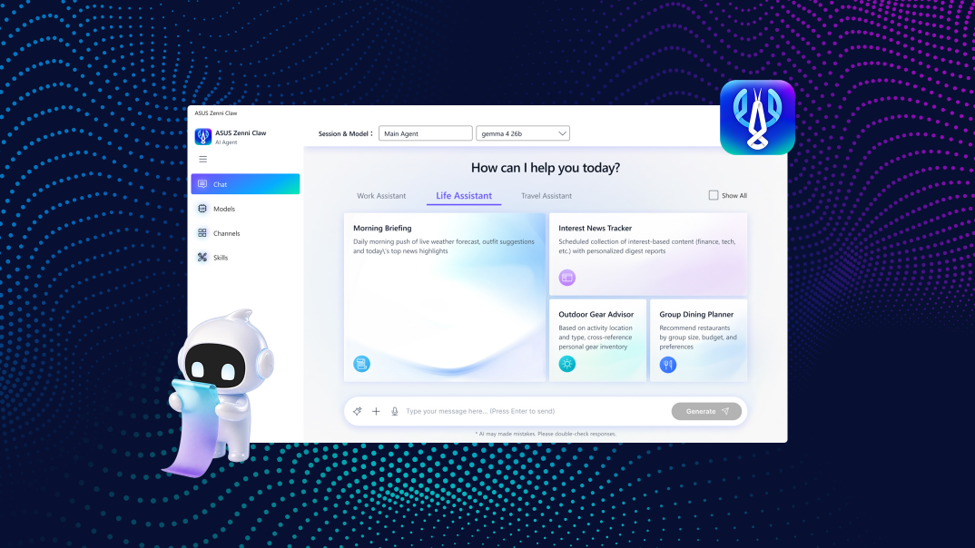
Built-in assistants for work, travel, and daily tasks
At launch, Zenni Claw includes three built-in assistants: Work Assistant, Travel Assistant, and Life Assistant.
The Work Assistant helps users organize meeting notes, generate action items, monitor industry news, and create editable presentation drafts.
Meanwhile, the Travel Assistant offers tools for monitoring flight prices, building travel itineraries, and discovering local attractions beyond traditional tourist destinations.
The Life Assistant focuses on everyday planning by providing weather briefings, personalized news updates, outdoor gear recommendations, and restaurant suggestions for group dining.
Overall, Zenni Claw launches with 11 ready-made tasks and 14 ASUS Skills, with support for user-created skills that can be accessed directly through the application’s chat interface.
Local and cloud AI processing
According to ASUS, Zenni Claw supports both hybrid and cloud-only processing modes.
The company said hybrid mode may process tasks locally or in the cloud to balance responsiveness, privacy, and computing efficiency. Devices that do not meet the hardware requirements for local AI models can still use the application in cloud-only mode.
ASUS also noted that the software operates within a contained workspace that is separate from users’ personal files and the main operating system. The application includes safety-focused features such as sensitive data filtering, prompt injection protection, and safeguards that keep API keys stored locally on the device.
Additional features planned
ASUS said Zenni Claw aims to expand beyond its initial feature set. Future updates will introduce additional assistants, including Creator Assistant and System Assistant, along with new workflows covering productivity, content creation, travel, and system management.
The company noted that future features and availability remain subject to change.
Availability and system requirements
ASUS Zenni Claw is now available as a free download from the ASUS website for supported ASUS devices running Windows 11 (64-bit).
The company recommends devices with at least 16GB of RAM and 20GB of available storage for the application. However, running local AI models requires higher hardware specifications. These include 32GB of RAM, compatible Intel Core Ultra Series X or AMD Ryzen AI Max Series processors, while ASUS recommends an NVIDIA GeForce RTX 5090 with 24GB or more of VRAM for the optimal local AI experience.
Although Zenni Claw is free to download, ASUS said some advanced cloud AI capabilities may require users to provide their own API access or incur token usage costs depending on the selected AI model. The application is also an optional download and is not preinstalled on supported devices.



Leave a Reply